
Eazy Swatches Shopify App: Create Beautiful Product Swatches and Improve Your Store Experience
Choosing the right product variant should be simple for shoppers. When customers need to open dropdown menus repeatedly to find a color, style, or size, the shopping experience can become frustrating.
That is where Eazy Swatches can help.
Eazy Swatches is a Shopify app designed to improve product variant selection with visual swatches, images, dropdowns, product groups, and customizable option layouts. It allows Shopify merchants to replace standard variant selectors with more visual and engaging options.
The app is developed by Mandolly Tech and is currently listed as a free Shopify app. According to its Shopify App Store listing, Eazy Swatches offers 20+ swatch templates, product grouping, multi-color swatches, customization controls, support for Shopify’s newer product model with up to 2,000 variants, multilingual support, and 24/7 live customer support.
In this guide, we will explore what Eazy Swatches is, its main features, benefits, setup process, use cases, and how it can improve the product selection experience in a Shopify store.
Quick Overview of Eazy Swatches
| Feature | Details |
|---|---|
| App Name | Eazy Swatches |
| Platform | Shopify |
| Developer | Mandolly Tech |
| Pricing | Free |
| Swatch Templates | 20+ |
| Swatch Types | Circular, square, pill-shaped, and more |
| Product Groups | Yes |
| Multi-Color Swatches | Yes |
| Image Swatches | Yes |
| Dropdown Options | Yes |
| Customization | Shape, size, colors, layout, borders |
| Hover Effects | Yes |
| Out-of-Stock Designs | Yes |
| Variant Support | Supports Shopify’s newer product model with up to 2,000 variants |
| Multilingual Support | Yes |
| Customer Support | 24/7 live support |
| Integration | Shopify Admin and Eazy Product Options & Variant |
The information above is based on the current Shopify App Store listing.
What Is Eazy Swatches?
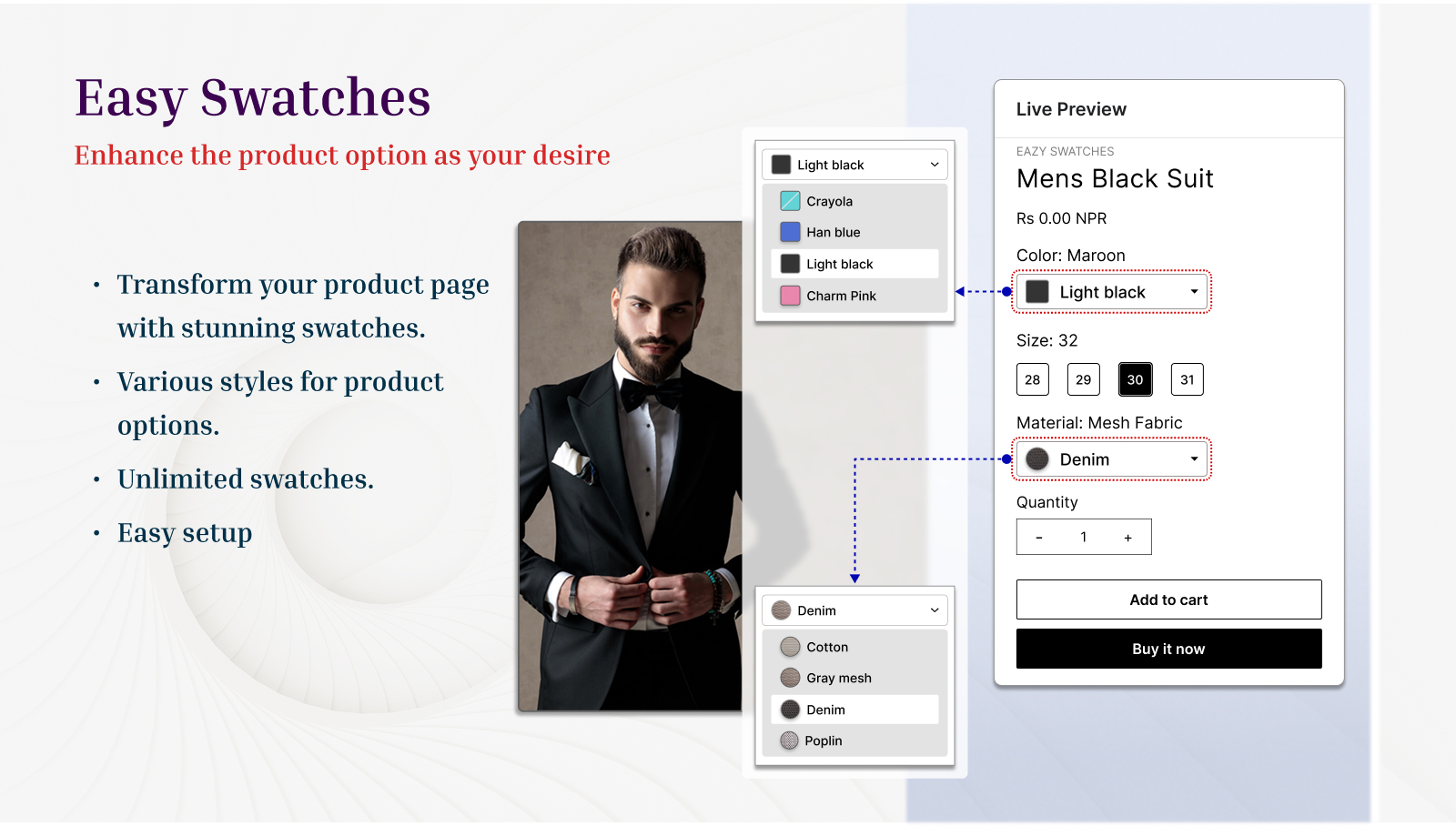
Eazy Swatches is a Shopify product variant swatch app that helps merchants display product options in a more visual format.
Instead of displaying every option through traditional dropdown menus, merchants can use visual elements such as color swatches, images, pills, circles, squares, and other layouts.
For example, imagine a clothing store selling a T-shirt in black, white, blue, and red.
A traditional product page might display:
Color: Select an option
With Eazy Swatches, the same options can be displayed as visual color circles or image-based swatches. Customers can immediately understand the available choices and select the option they want.
The app also allows merchants to create product groups, which can be useful when several related products need to be presented as selectable options.
Why Are Product Swatches Important for Shopify Stores?
Product variants are an important part of many online stores.
Fashion, beauty, furniture, jewelry, electronics, home décor, and other ecommerce businesses often sell products with multiple colors, sizes, materials, styles, or designs.
A standard dropdown can work, but it does not always provide the best visual experience.
1. Customers Can Understand Options Faster
Visual information can be easier to scan than a long list of text options. A customer looking for a specific color can identify it from a color swatch instead of reading through a dropdown.
2. Product Pages Can Look More Professional
Well-designed swatches can make product pages feel cleaner and more modern. For visual products, such as clothing or furniture, showing options visually can also help shoppers understand what they are buying.
3. Variant Selection Becomes More Interactive
Swatches can make product selection feel more natural. Customers can click, compare, and change options without repeatedly opening dropdown menus.
4. Merchants Get More Design Control
Eazy Swatches provides customization options for shapes, sizes, colors, borders, layouts, hover animations, and out-of-stock designs. This means merchants can create a swatch layout that better matches their store design.
Key Features of Eazy Swatches
1. 20+ Swatch Templates
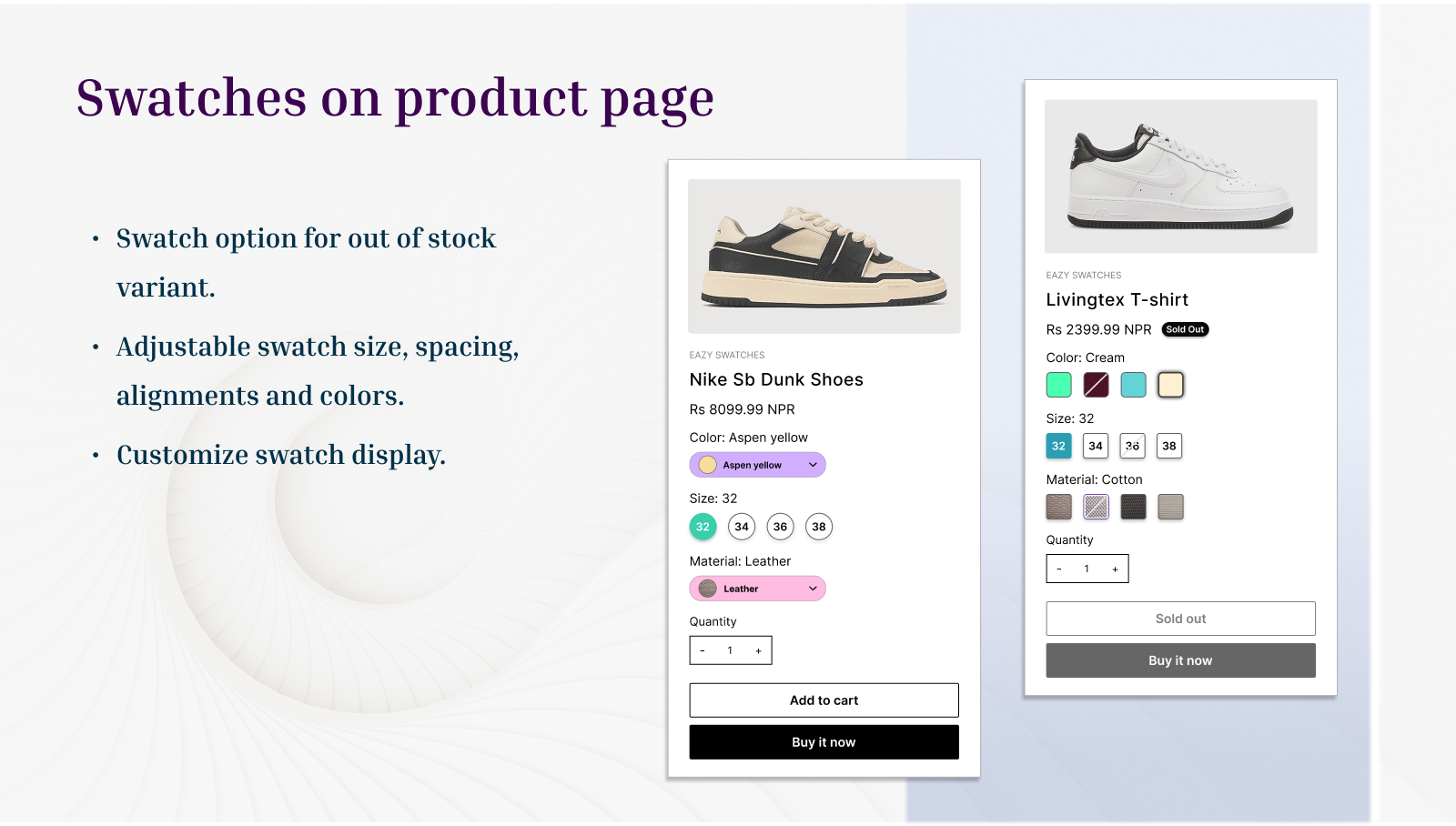
One of the main features of Eazy Swatches is its collection of more than 20 swatch templates. Merchants can choose from different visual styles, including circular, square, and pill-shaped options. This makes it possible to create different experiences for different product categories.
For example:
- Clothing stores can use circular color swatches.
- Furniture stores can use image swatches.
- Jewelry stores can use polished color or image options.
- Beauty stores can use shade swatches.
- Footwear stores can use image-based styles.
- Home décor stores can use material or pattern images.
The variety of templates gives merchants more flexibility than a basic variant dropdown.
2. Color Swatches
Color is one of the most common product variations in ecommerce.
Instead of showing:
- Black
- White
- Blue
- Green
- Red
as text inside a dropdown, merchants can display these options as visual swatches. This can make color selection quicker and easier.
Color swatches are particularly useful for:
- Clothing
- Shoes
- Bags
- Cosmetics
- Furniture
- Home décor
- Accessories
- Phone cases
3. Image Swatches
Some product options cannot be represented effectively with a simple color.
For example, a furniture store may sell a sofa in:
- Leather
- Velvet
- Linen
- Cotton
In this situation, image swatches can provide more useful visual information.
Eazy Swatches supports image-based options, allowing merchants to create more informative product selectors.
4. Multi-Color Swatches
Products sometimes contain more than one color.
For example:
- Black and White
- Blue and Gray
- Red and Gold
- Pink and Purple
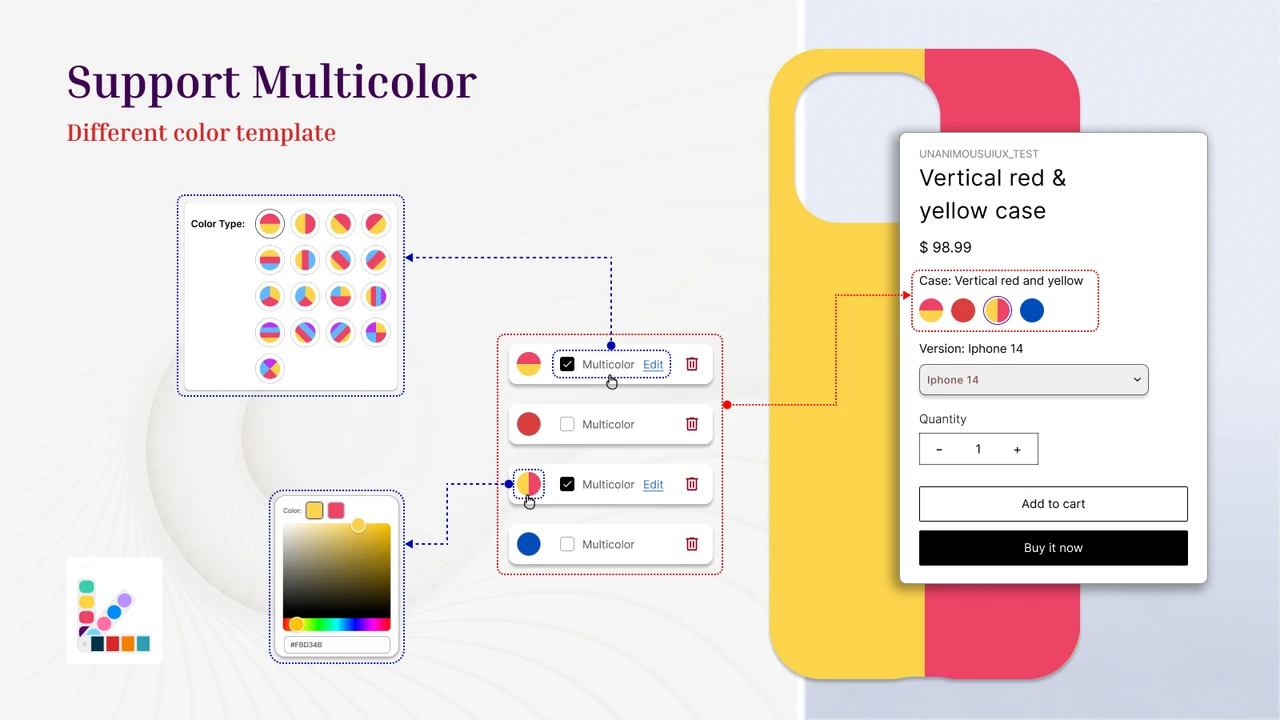
Eazy Swatches supports multi-color swatches, making it possible to represent combinations more accurately. This can be useful for fashion products, accessories, home décor, and products with gradient or mixed-color designs.
5. Product Groups
Another useful feature is the ability to group products as options.
Suppose a clothing brand sells the same design as separate products:
- Classic T-Shirt – Black
- Classic T-Shirt – White
- Classic T-Shirt – Blue
Instead of making customers search for each product separately, product grouping can help present related products together as selectable options. This can create a more connected product browsing experience. Eazy Swatches specifically supports product groups for displaying related products as options.
6. Customizable Swatch Design
Every Shopify store has a different visual identity.
A luxury fashion store may prefer small, elegant swatches, while a colorful children’s store may want larger and more playful options.
Eazy Swatches provides customization controls for:
- Swatch shape
- Swatch size
- Colors
- Layout
- Border styles
- Hover effects
- Out-of-stock appearance
The app also provides a live preview so merchants can review changes while customizing their swatches.
7. Hover Animations
Interactive elements can make product pages feel more engaging. Eazy Swatches includes hover animation options, allowing merchants to add interactive behavior to their swatches. When a shopper moves the cursor over an option, the visual feedback can make the selection interface feel more responsive. However, merchants should avoid excessive animations. The goal should always be usability rather than decoration.
8. Out-of-Stock Designs
Out-of-stock variants need to be clearly communicated. If a customer sees an unavailable option without any indication that it cannot be purchased, they may become confused. Eazy Swatches provides options for customizing how unavailable selections appear. This can help shoppers understand product availability before attempting to add an unavailable variation to their cart.
9. Global or Individual Swatch Control
Merchants can enable swatches globally or apply them individually to products. This flexibility can be useful for stores with different product categories. For example, a fashion store might use swatches across most clothing products but use image-based options for furniture or accessories. The ability to control swatches globally or individually gives merchants more flexibility when managing a large catalog.
10. Automatic Option Data
Setting up variant swatches manually can become time-consuming when a store has many products. Eazy Swatches can automatically fetch options, colors, and option images from the store, reducing the amount of manual setup required. This can be especially useful for stores with a large product catalog.
Eazy Swatches and Shopify Product Variants
Shopify stores can have products with multiple variants.
For example, a shirt could have:
Color: Black, White, Blue
Size: Small, Medium, Large
That creates multiple possible combinations.
As catalogs grow, managing and presenting these variants can become increasingly important. Eazy Swatches supports Shopify’s newer product model with up to 2,000 variants, according to the Shopify App Store listing. For merchants with products containing many variations, a visual selection system can make the product page easier to navigate.
Eazy Swatches for Different Ecommerce Industries
Fashion Stores
Fashion brands are one of the strongest use cases for product swatches.
Customers frequently need to choose:
- Color
- Size
- Style
- Pattern
- Material
Color and image swatches can make these selections easier to understand.
Furniture Stores
Furniture shoppers often need to choose:
- Fabric
- Material
- Finish
- Color
- Style
Image swatches can provide a better representation of these choices than text alone.
Beauty Stores
Beauty products often have multiple shades.
For example, a lipstick product may have dozens of colors.
Visual shade swatches can make it easier for customers to compare their options.
Jewelry Stores
Jewelry products can have different:
- Metal colors
- Finishes
- Gemstones
- Designs
Swatches can provide a clean way to organize these choices.
How to Install Eazy Swatches on Shopify
Installing Eazy Swatches is designed to be straightforward.
Step 1: Open the Shopify App Store
Go to the Shopify App Store and search for Eazy Swatches.
You can also access the official app listing directly:
Eazy Swatches on the Shopify App Store
Step 2: Select Eazy Swatches
Open the app listing and review its features, supported functionality, reviews, and compatibility information. The app is developed by Mandolly Tech and is listed as free on the Shopify App Store.
Step 3: Click Install
Select the installation option and follow Shopify’s authorization process. Shopify will show the permissions required by the app before installation.
Step 4: Open the App
After installation, open Eazy Swatches from your Shopify admin. You can then begin configuring your product swatches.
Step 5: Choose a Swatch Template
Select a template that fits your store design. You can choose different shapes and visual styles, including circular, square, and pill-shaped options.
Step 6: Configure Product Options
Choose which product options should be displayed as swatches.
Depending on your catalog, these might include:
- Color
- Size
- Style
- Material
- Pattern
- Product image
Step 7: Customize the Design
Adjust the appearance of your swatches.
You can customize elements such as:
- Size
- Shape
- Colors
- Borders
- Layout
- Hover effects
- Out-of-stock styling
Step 8: Preview Your Changes
Use the available preview functionality to check how your swatches look. Make sure the design is easy to understand on both desktop and mobile devices.
Step 9: Enable the Swatches
Once everything looks correct, activate the swatches for the desired products. You can use global settings or apply swatches individually, depending on your store requirements.
Best Practices for Using Shopify Product Swatches
Installing a swatch app is only the first step. The design of your swatches also matters.
1. Use Accurate Colors
Make sure the displayed color represents the actual product as closely as possible. Incorrect color representation can create unrealistic customer expectations.
2. Use High-Quality Images
If you use image swatches, use clear and relevant product images. Avoid blurry or poorly cropped images.
3. Keep Swatches Consistent
Use consistent sizing and spacing throughout your product pages. A clean layout makes options easier to scan.
4. Make Selected Options Obvious
Customers should immediately know which option they have selected. Use clear borders, indicators, or other visual states.
5. Consider Mobile Users
A large percentage of ecommerce traffic comes from mobile devices.
Make sure swatches are:
- Easy to tap
- Properly spaced
- Clearly labeled
- Responsive
- Not overcrowded
Eazy Swatches vs Traditional Shopify Variant Dropdowns
A traditional dropdown is simple and familiar.
However, it can become less convenient when a product has many visual variations.
For example:
| Traditional Dropdown | Eazy Swatches |
|---|---|
| Text-based selection | Visual selection |
| Requires opening a dropdown | Options visible on the page |
| Limited visual information | Colors and images can be displayed |
| Basic appearance | Multiple design templates |
| Less visual interaction | Hover and selection effects |
| Limited customization | Shape, size, border, layout customization |
| Can be difficult for visual products | Useful for color, style, image, and material choices |
This does not mean every Shopify store needs swatches. Simple products with few variations may work perfectly well with standard selectors.
However, stores with highly visual products can benefit from a more visual variant experience.
Eazy Swatches Customer Reviews
Eazy Swatches has received positive feedback on the Shopify App Store.
The current listing shows a 4.9-star rating, with the exact review count changing as new reviews are submitted. Recent reviewers have highlighted the app’s customization options, straightforward setup, visual variant selection, and responsive support.
One recent reviewer described the app as useful for replacing default Shopify variant dropdowns with cleaner visual swatches and noted that it worked with different variant types such as color, size, and custom options.
Another review praised the number of customization choices and the speed of support when an issue occurred.
Reviews are useful when evaluating an app, but merchants should also test the app on their own theme and product catalog before making a final decision.
Is Eazy Swatches Free?
Yes.
The Shopify App Store currently lists Eazy Swatches as a free app.
This can make it an attractive option for Shopify merchants who want to improve product variant presentation without adding another recurring app expense.
Always check the current Shopify App Store listing before installation because app pricing and features can change over time.
Does Eazy Swatches Support Multiple Languages?
Yes.
The Shopify App Store currently lists support for multiple languages, including:
- English
- German
- French
- Spanish
- Italian
- Portuguese
- Japanese
- Chinese
- Dutch
- Czech
- Polish
- Danish
This can be useful for merchants operating stores that serve international customers.
Eazy Swatches and Eazy Product Options
Eazy Swatches also works with Eazy Product Options & Variant, according to its Shopify App Store listing.
This combination can be useful for stores that need more than standard Shopify variants.
For example, a merchant might use visual swatches for colors and images while using product options for additional customization requirements.
This creates an opportunity to build a more flexible product configuration experience.
Who Should Use Eazy Swatches?
Eazy Swatches may be a good fit for Shopify merchants who:
- Sell products with multiple colors.
- Need image-based product options.
- Want to replace standard variant dropdowns.
- Sell highly visual products.
- Want customizable swatch designs.
- Manage products with many variants.
- Want to group related products.
- Need multi-color swatches.
- Want a free swatch solution.
- Prefer a visual product selection experience.
It may be less necessary for stores that sell simple products with only one or two straightforward options.
Pros and Considerations
Pros
- Free to use: The Shopify App Store currently lists Eazy Swatches as free.
- Multiple templates: More than 20 templates provide different visual styles.
- Visual product selection: Customers can see colors and images instead of relying only on text.
- Product groups: Related products can be presented as options.
- Customization: Merchants can customize shape, size, colors, borders, and layouts.
- Large variant support: The listing states support for Shopify’s newer product model with up to 2,000 variants.
- Multilingual: The app supports multiple languages.
- Customer support: The listing advertises 24/7 live customer support.
Considerations
Before installing any Shopify app, merchants should test it with their specific theme and product catalog.
Pay particular attention to:
- Mobile responsiveness
- Theme compatibility
- Product variant behavior
- Page performance
- Accessibility
- Swatch labeling
- Out-of-stock behavior
- Overall product-page layout
A visually attractive swatch is only useful if customers can understand and use it easily.
How Eazy Swatches Can Improve the Shopify Shopping Experience
The purpose of product swatches is not simply to make a product page look better. Their purpose is to make product selection easier. Consider a customer shopping for a pair of shoes.
They need to select:
Color → Size → Style
If all options are hidden inside dropdown menus, the customer needs to repeatedly open menus and read text. A visual swatch interface can make those options immediately visible. The customer can see the available choices, select an option, and continue shopping. That creates a simpler product selection process.
Frequently Asked Questions About Eazy Swatches
1. What is Eazy Swatches?
Eazy Swatches is a Shopify app for displaying product options using visual swatches, images, dropdowns, product groups, and customizable layouts. It is developed by Mandolly Tech.
2. Is Eazy Swatches free?
Yes. The Shopify App Store currently lists Eazy Swatches as free.
3. Does Eazy Swatches support color swatches?
Yes. Eazy Swatches supports color and multi-color swatches along with image-based options.
4. Can I customize Eazy Swatches?
Yes. The app provides customization options for swatch shape, size, colors, layout, borders, hover effects, and out-of-stock designs.
5. Does Eazy Swatches support image swatches?
Yes. Image-based options are supported, making the app useful for products where color alone does not adequately represent a variation.
6. Can I group related Shopify products?
Yes. Eazy Swatches includes product grouping functionality that allows related products to be displayed as options.
7. Does Eazy Swatches work with large product catalogs?
The Shopify App Store listing states that the app supports Shopify’s newer product model with up to 2,000 variants.
8. Does Eazy Swatches support multiple languages?
Yes. The app listing currently includes support for multiple languages, including English, German, French, Spanish, Italian, Portuguese, Japanese, Chinese, Dutch, Czech, Polish, and Danish.
9. Does Eazy Swatches work with Eazy Product Options?
Yes. The Shopify App Store lists Eazy Product Options & Variant as a supported integration.
Final Verdict: Is Eazy Swatches Worth Trying?
Eazy Swatches is a useful Shopify app for merchants who want to make product variant selection more visual, customizable, and user-friendly.
Its combination of color swatches, image options, multi-color swatches, product groups, customizable templates, hover effects, and out-of-stock styling makes it suitable for a wide range of Shopify stores. The app is particularly relevant for fashion, beauty, furniture, jewelry, accessories, and home décor businesses where customers need to compare visual product variations. Another major advantage is its current free pricing, which allows merchants to experiment with visual product options without adding another subscription cost.
If your Shopify store currently relies heavily on standard variant dropdowns, testing Eazy Swatches could be a practical way to create a cleaner product-selection experience.
Try Eazy Swatches on the Shopify App Store
Conclusion
Product options should be easy to understand, especially when customers are choosing between colors, styles, materials, or images.
Eazy Swatches gives Shopify merchants a practical way to transform standard product variant selection into a more visual experience.
With 20+ templates, customizable designs, image and color swatches, product groups, multi-color options, variant support, multilingual capabilities, and free pricing, it provides a strong set of features for Shopify merchants looking to improve their product pages. For stores where product appearance plays an important role in purchasing decisions, a well-designed swatch system can make product selection simpler and more intuitive.
If you are looking for a Shopify solution to improve color, image, and variant selection, Eazy Swatches is worth exploring.